
Lumosity: Brain Training Games
Lumos Labs, Inc.Education
4.824.63K Reviews
- Version
- 10.20.67
- Installs
- 10.00M
- Age Rating
- Everyone
Screenshots
Our Review of Lumosity: Brain Training Games
 Analysis by Appyee
I first opened Lumosity: Brain Training Games expecting a quick distraction, and the short rounds made it easy to try several activities without planning a big session. The appeal is immediate: the games ask for attention and quick decisions, and each one gives me a small, clear challenge. That makes the app an easy fit for a spare moment, though the real question is whether that first-week novelty can turn into a routine I still want to keep.
A lively start, with a routine to guide it
As an education app from Lumos Labs, Inc., Lumosity is built around short brain-training games rather than lessons or long explanations. Its opening flow asks about your goals and uses your answers to shape a daily workout. I like having a suggested starting point; it removes the small but real friction of deciding what to play when I only have a few minutes.
The first sessions are especially inviting if you enjoy puzzles that reward concentration and quick reactions. The variety gives the routine a sense of movement, while the immediate feedback makes it tempting to try again and improve a result. I would treat that early enthusiasm as a useful nudge, not proof that every session will stay fresh. Once I know how a game works, its basic challenge can become familiar.
A practical way to test the fit is to use a consistent, low-pressure moment, such as a quiet break after lunch. A short session can be easier to sustain than promising yourself a long daily workout. If you miss a day, I would simply return when convenient rather than trying to compensate with a marathon session. The point is to see whether the activity suits your day, not to turn a casual app into another obligation.
The games reward attention, but repetition matters
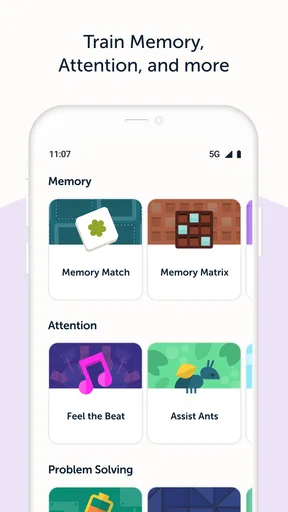
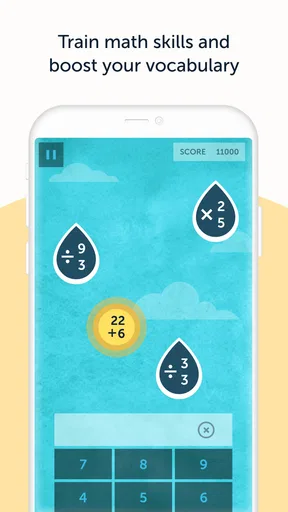
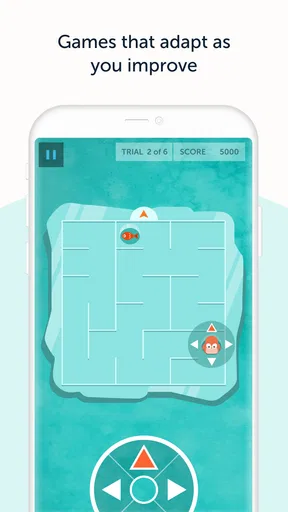
Now, let's talk about the games themselves. Lumosity offers a variety of fun, quirky games that target different areas of cognition, like memory, attention, flexibility, and problem-solving. Each game is designed with a specific cognitive skill in mind, and honestly, they’re quite addictive.
One of my favorites is "Speed Match," where you have to quickly decide if the shape on the screen matches the one before it. It's fast-paced and keeps you on your toes! Another game, "Train of Thought," challenges your multitasking abilities by making you manage the direction of trains to their correct stations. Both fun and challenging, just the way I like it.
The contrast between those examples is part of what makes the collection useful: Speed Match is a focused, rapid judgment task, while Train of Thought asks me to monitor more than one moving demand. I find it helps to notice which kind of challenge I am in the mood for instead of treating every game as interchangeable. When I am tired, a fast reaction task can feel more frustrating than stimulating; when I have a little more attention to spare, a multitasking challenge can be a welcome change.
Over time, I would rotate attention between different types of games rather than chasing a personal best in just one. That keeps the experience from narrowing into repeated attempts at the same familiar task. It also makes the workout feel more varied, though it does not guarantee that every activity will hold my interest equally. The best routine is the one I can return to without feeling that I am grinding through a checklist.
Getting Started with Lumosity
First things first, downloading Lumosity is a breeze. It's available on both Android and iOS, so no matter what kind of phone you're rocking, you're covered. Once you’ve got it installed, the app greets you with a clean and friendly interface. Seriously, it’s like it's saying, "Hey, let's make your brain a little smarter today!"
After a quick sign-up process, which involves setting up a profile and answering a few questions about your cognitive goals, you're ready to dive into the world of brain training. The app uses this info to customize a daily workout routine just for you. It's pretty neat how it takes your personal goals into account!
The Games: Fun Meets Function
One detail I would keep in mind is what a daily workout can and cannot tell you. The scores give you a way to follow your play and compare your own sessions, which can be satisfying. But a better result in a particular game is not the same thing as a broad measure of everyday concentration or memory. I enjoy the feedback most when I treat it as a record of how I am doing at these activities, rather than as a verdict on my intelligence or health.
The app also presents comparisons with people in your age group. That can add context to a result, but it can also shift the focus from curiosity to competition. If rankings make a casual practice feel stressful, I would pay more attention to my own changing results and less to where I sit beside other players. That small change in how you read the feedback can make the routine feel more personal and less like a test.
For a realistic everyday use, I can imagine opening Lumosity while waiting for a delayed appointment or taking a break between household tasks. The session gives that otherwise idle stretch a clear activity, and it is easy to stop when the break ends. I would avoid using it while walking, driving, or doing anything that needs attention; quick decisions on a screen are best saved for a safe, settled moment.
Progress is useful when you read it carefully
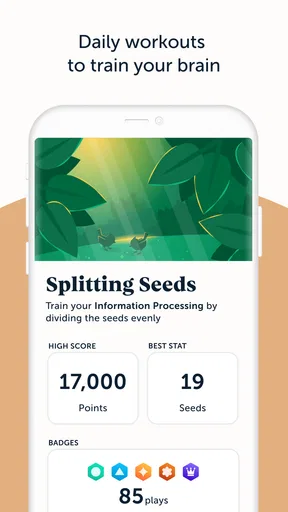
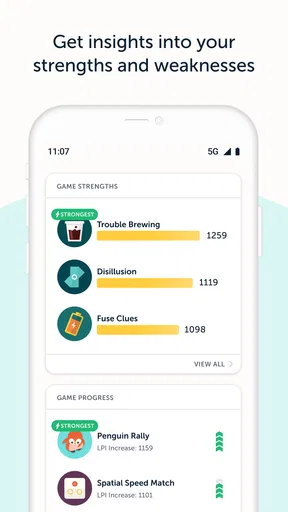
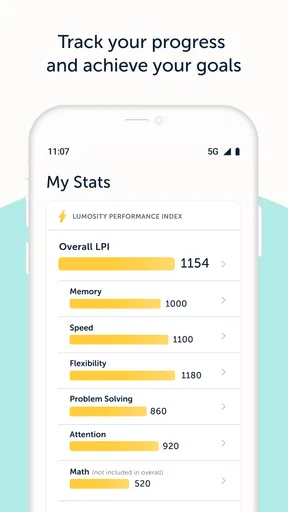
One feature I really appreciate is the progress tracker. Lumosity provides detailed stats and insights on how your skills are improving over time. You can see your strengths and the areas where you might need a little more work. It's super motivating to see those graphs climb upwards!
The app also offers a "Performance Index," which is a neat little summary of your cognitive abilities. It tracks your improvement across different domains and gives you a visual representation of how you’re doing. It feels really rewarding to see tangible results from your daily brain workouts.
For month-to-month use, these summaries are most valuable as a prompt to reflect: Which activities do I enjoy returning to? Which ones feel harder when I am distracted or low on energy? That is a more practical question than expecting a score to explain every change in my focus. I would look for patterns across sessions instead of overreacting to one unusually strong or weak result.
There is also a trade-off in tracking. Numbers and graphs can encourage consistency, but they can make a leisure activity feel like homework if I check them too often. I would use the progress view occasionally, then return to playing for the challenge itself. That balance helps the app remain a small mental break rather than a project that demands constant monitoring.
Where it fits among brain-training options
Compared with a crossword, a logic puzzle, or a general puzzle game, Lumosity offers a more guided, game-based routine and feedback tied to its activities. Those alternatives may suit someone who prefers open-ended problems, paper puzzles, or a single activity they can pursue at their own pace. Lumosity is a better match if you want several short challenges gathered in one place and appreciate having a suggested workout rather than choosing a puzzle from scratch.
That distinction matters because brain training is not a substitute for every kind of learning or recreation. If your goal is to learn a language, build subject knowledge, or work through a complex strategy game, those options give you a different kind of practice. I would choose Lumosity for bite-sized cognitive challenges, not as a replacement for reading, studying, or hobbies that involve deeper projects.
It is also worth being realistic about what makes the games satisfying. They can help me practice the specific tasks presented on screen and make a short break more engaging. I would not use my progress as evidence that my everyday abilities have changed in the same way. That distinction does not make the games pointless; it simply keeps my expectations sensible and lets the app be enjoyable on its own terms.
Free access, paid extras, and the decision to continue
So, is Lumosity worth your time and potentially your money? Well, that depends. The app offers a free version, but to unlock its full potential, you might want to consider the premium subscription. With it, you get access to a wider range of games and more detailed insights.
The app is free to download, while in-app purchases range from $0.99 to $159.99 per item. I would start with the free access and first ask whether I actually return to the routine. A paid option only makes sense for me if the extra activities or insights address something I want, not simply because I assume paying will make a habit stick. The available purchase choices can vary in scale, so I would read the in-app details carefully before committing.
The maintenance burden is fairly ordinary: the app needs a place in your routine, and the routine needs to stay small enough that you do not resent it. The bigger obstacle is often remembering to open it once the novelty fades. Linking it to a break you already take is more dependable than waiting for a burst of motivation. If you find yourself skipping sessions because the games feel repetitive, taking a pause is more sensible than forcing daily use.
Fatigue can come from chasing scores, repeating a task after a frustrating result, or expecting every game to feel equally engaging. I would stop a session when I notice I am tapping through without paying attention; at that point, the activity is no longer giving me a satisfying challenge. A short break or a different kind of puzzle may be a better choice than pushing on just to keep a streak of effort alive.
Who is likely to keep it installed?
If you like brief, structured puzzles and want a gentle prompt to practise them regularly, this is an easy app to try. Its Everyone age rating makes it broadly accessible, and its 10M+ installs and 4.7 average rating suggest that many people have found a reason to use it. Those figures do not tell me whether it will suit your habits, so I would judge it by whether you enjoy the actual games and find the feedback helpful.
I would be less likely to recommend it to someone who dislikes timed tasks, gets discouraged by performance comparisons, or wants a clearly defined course with lessons and measurable real-world outcomes. It may also be the wrong choice if you prefer a completely unstructured puzzle, or if a screen-based activity is not how you want to spend a break. In those cases, a book of puzzles, a physical hobby, or a more focused learning app could be a better fit.
The listing shows a release date of June 8, 2014, and the current version is 10.19.84, with a minimum operating system requirement of 7.0. That gives a quick compatibility check before installing; I would still make sure my device can run the version offered through its app store. The large number of ratings and reviews reflects a well-established app, but personal fit still comes down to its particular mix of quick games, daily structure, and score feedback.
My long-term verdict
If you’re serious about brain training and enjoy challenging yourself, the premium version could be a worthwhile investment. But even the free version offers enough variety to keep you engaged and give your brain a solid workout.
From my experience, Lumosity: Brain Training Games is perfect for anyone looking to keep their mind sharp in a fun and interactive way. Whether you're commuting or just chilling at home, these games provide a productive way to pass the time.
So go ahead, give Lumosity a try and see for yourself how it feels to make brain training a part of your daily routine. Who knows, you might just find yourself a little sharper and quicker on the draw!
Verdict
Strengths of Lumosity: Brain Training Games
- Engaging variety of brain games.
- Tracks your progress over time.
- Personalized training plans.
- User-friendly interface design.
- Supports multiple languages.
Limitations of Lumosity: Brain Training Games
- Requires subscription for full access.
- Limited offline functionality.
- Some games may feel repetitive.
- Ads in the free version can be intrusive.
- Performance tracking can be inconsistent.
Similar Picks in This Category
View All
Duolingo: Language Lessons
Duolingo4.7

Google Classroom
Google LLC2.8

Unacademy: Learn & Crack Exams
Unacademy3.2

Bible App for Kids
Life.Church4.4

Cake - Learn English & Korean
Cake Corp.4.7

Brainly: AI Homework Helper
Brainly4.5
Frequently Asked Questions
What is Lumosity and how does it work?
Lumosity is a brain training app designed to help improve cognitive skills through a series of fun and challenging games. It offers personalized training sessions that adapt to your performance, helping you target specific areas like memory, attention, and problem-solving. By regularly engaging with the app, users can track their progress and see improvements over time.
Is Lumosity suitable for all age groups?
Lumosity is designed for adults but is also suitable for teens. The games are crafted to be engaging and challenging for a wide range of ages, though younger children may need guidance or find it too advanced. It's important for parents to assess whether the content is appropriate for their child’s age and cognitive development.
Does Lumosity require a subscription?
While Lumosity offers a free version with limited access to games, a subscription is required to unlock the full range of features, including personalized training plans and detailed progress tracking. Subscribers can choose between monthly or annual plans, with the annual option offering the best value for regular users.
How does Lumosity ensure the effectiveness of its brain training games?
Lumosity’s games are developed by a team of scientists and game designers who base their work on cognitive research. The app's effectiveness is continually tested and refined through user data and feedback, ensuring the exercises are not only fun but also beneficial for cognitive development. However, results can vary by individual.
Can Lumosity be used offline?
Lumosity requires an internet connection for initial setup and to download new games or updates. However, once games are downloaded, some can be played offline. To get the full experience, including progress tracking and personalized training updates, users should connect to the internet regularly.
